

WordPress est le nec plus ultra des plates-formes sémantiques de publication personnelle, alliant esthétique, standards du Web et utilisabilité. Gratuit, Wordpress possède une valeur inestimable.
La version francisée est intégralement réalisée par l’équipe de l’association WordPress Francophone. Outre un blog proposant les dernières nouvelles importantes du monde de WordPress, son site donne accès à un forum d’entraide en français, où vous pourrez poser des question et apprendre à résoudre vos problèmes grâce aux membres de la communauté WordPress.
Notez que WordPress Francophone n’assure pas le support du service commercial WordPress.com…
Installation :
WordPress est célèbre pour être installé et prêt à publier en 5 minutes ! Voici comment :
- Téléchargez et décompressez WordPress si ça n’est pas déjà fait,
- Créez une base de données pour WordPress sur votre serveur Web, de sorte que MySQL ait tous les privilèges en accès et en modification,
- Renommez le fichier
wp-config-sample.phpenwp-config.php - Ouvrez le fichier
wp-config.phpdans votre éditeur de texte favori et complétez les informations de la base de données (et le langage utilisé par le blog si nécessaire). - Déposez les fichiers de WordPress à l’emplacement désiré sur votre serveur Web :
- Si vous souhaitez placer WordPress à la racine de votre domaine (par exemple
http://www.example.com/), déplacez ou téléchargez tout le contenu du répertoire WordPress décompressé (en excluant le répertoire lui-même) dans le répertoire racine de votre serveur Web. - Si vous souhaitez placer votre installation de WordPress dans un sous-répertoire de votre site Web (par exemple
http//www.example.com/blob/), renommez le répertoirewordpressavec le nom que vous avez choisi pour le sous-répertoire et déplacez ou téléchargez-le vers votre serveur Web. Par exemple, si vous voulez que votre installation de WordPress soit présente dans le sous-répertoire appelé “blog”, vous devez renommer le répertoire appelé “wordpress” en “blog” et le télécharger dans le répertoire racine de votre serveur Web.
- Si vous souhaitez placer WordPress à la racine de votre domaine (par exemple
- (Facultatif) Si vous avez téléchargé la version anglaise de WordPress, vous devez copier le fichier de traduction
fr_FR.mo(correspondant à la version de WordPress installée) dans le sous-dossierwp-includes/languages. Vous devrez peut-être créer ce répertoire s’il n’existe pas déjà. - Lancer le script d’installation de WordPress en ouvrant
wp-admin/install.phpdans votre navigateur Web préféré.- Si vous avez installé WordPress dans le répertoire racine, vous devriez vous rendre ici :
http://www.example.com/wp-admin/install.php - Si vous avez installé WordPress dans un sous-répertoire appelé blog, par exemple, vous devriez vous rendre ici :
http://www.example.com/blog/wp-admin/install.php
- Si vous avez installé WordPress dans le répertoire racine, vous devriez vous rendre ici :
Et voilà ! WordPress devrait à présent être installé.


 Mise a jour de ce programme toujours GRATUIT ! DVDFab HD Decrypter remplace désormais DVDFab Decrypter qui a les même fonctions (CSS, RC, RCE, APS, UOPs et Sony ARccOS) et en plus supporte les fonctions HD-DVD et Blu-Ray ( Retire la protection AACS )

 Daemon Tools est un programme d'émulation pour faire tourner vos sauvegardes ayant la protection SafeDisc , Securom ou LaserLock. Il inclue un lecteur CD/DVDROM virtuel .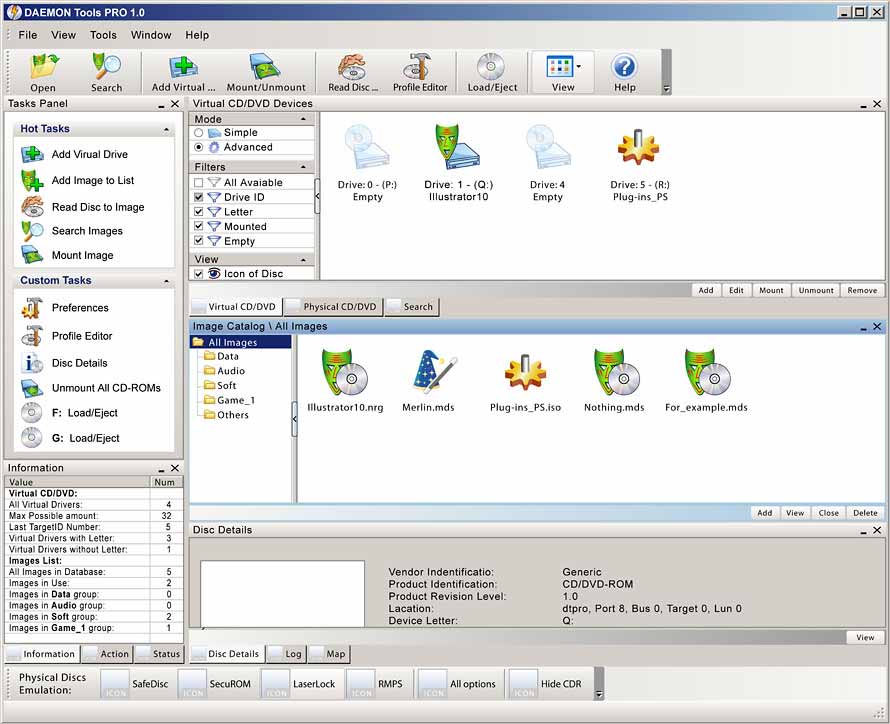


 Any Video Converter is an All-in-One video converting tool with easy-to-use graphical interface, fast converting speed and excellent video quality. It allows you to effortlessly convert video files between every format! It can convert almost all video formats including DivX, XviD, MOV, rm, rmvb, MPEG, VOB, DVD, WMV, AVI to MPEG-4 movie format for iPod/PSP or other portable video device, MP4 player or smart phone. It also supports any user defined video file formats as the output. Any Video Converter makes it easy for anyone to enjoy any format video with your iPod, PSP, mobile phone or MP4 player.


 Auslogics Disk Defrag is a compact, manual defragmentation tool that supports FAT 16, FAT 32, and NTFS (with compressed and encrypted files). For the individual user, Disk Defrag is more than adequate for the job of maintaining high-level disk performance. Disk fragmentation leads to system slowdowns, PC crashes, slow startup and shutdown and sometimes to system failures. Auslogics Disk Defrag® is designed for fast optimization of today's modern hard disks. Get the maximum performance out of your expensive hardware investments. And it's absolutely FREE.
