jeudi 20 décembre 2007

DAEMON Tools Lite 4.11.1

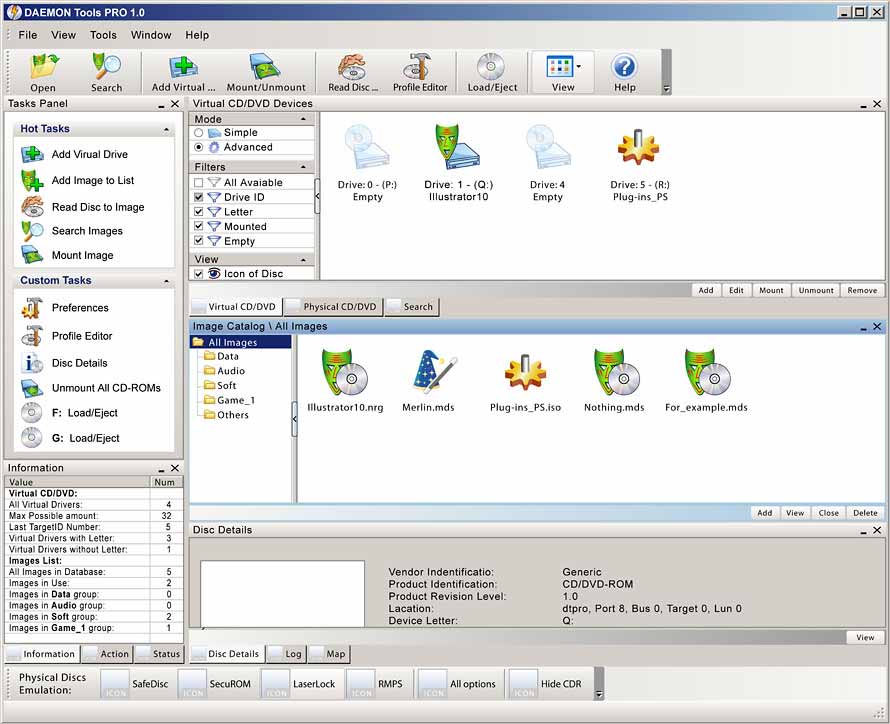
   Daemon Tools est un programme d'émulation pour faire tourner vos sauvegardes ayant la protection SafeDisc , Securom ou LaserLock. Il inclue un lecteur CD/DVDROM virtuel .

Changelog :

  • DT Panel is now optional (it is possible uncheck "Enable" checkbox DT Panel during installation)
  • left double-click action on DT icon in tray is removed
  • several new languages are added
  • fixed several bugs;
  • Known issue: Some English language strings may not be translated to local languages
  • ( included is SPTD version Version 1.53 )

                Il est fortement recommandé de mettre à jour votre version .


              Pour le téléchargement veuillez clicquez sur le logo ci-dessous !

                  Accéder à la page de téléchargement


mercredi 19 décembre 2007

VSO PhotoDVD 2.6.0.1

 le logiciel VSO PhotoDVD réalise un diaporama sur DVD de vos photos numériques pour les regarder sur votre télévision. Idéal pour partager ses souvenirs en famille, profitez de la haute définition du format DVD bien meilleur que le format CD. Quelques clics suffiront pour graver un album photo avec VSO Photo DVD. Ajouter de la musique au diaporama et vos commentaires textes avec des sous-titres. Ce produit ne nécessite pas de connaissances particulières en informatique, il convient donc aux débutants. Idéal pour animer un mariage, une naissance, garder un souvenir de vacances ou tout autre évènement.

Une interface vous permet de choisir fichiers ou dossiers où vous souhaitez récupérer vos images de l'appareil photo numérique. Vous pouvez également sélectionner jusqu'à 3 pistes de musique de fond. Les transitions et animations de vos images sont entièrement automatiques avec un léger mouvement de zoom ou déplacement que vous pourrez définir si vous le souhaitez sur chaque photo. Vous pouvez ensuite les visionner sur votre ordinateur ou votre lecteur DVD qui offre la meilleure qualité disponible du moment. Une copie de vos fichiers source est stockée dans votre projet, vous permettant ainsi de garder la trace de vos images numériques sans la moindre perte de qualité afin de les retoucher ou imprimer ultérieurement.

                                           Télécharger VSO PhotoDVD 2.6.0.1    

Nero Burning Rom 8.2.8.0


       Nouvelle mise à jour du nouveau logiciel Nero 8 qui passe en version 8.2.8.0.

                 Pas de changelog disponible au moment de cette publication.

                   Attention ! Procéder comme ceci pour avoir cette mise à jour :

  1. Se connecter sur le site : http://www.nero.com/fra/downloads-nero8-update.php
  2. Mettre : Français
  3. Cliquez sur Télécharger


                                           Télécharger Mise à jour Nero 8 Ultra Edition 8.2.8.0     

Windows Sysinternals Suite 18/12/07


The Sysinternals Troubleshooting Utilities have been rolled up into a single Suite of tools. This file contains the individual troubleshooting tools and help files. It does not contain non-troubleshooting tools like the BSOD Screen Saver or NotMyFault.

       The Suite is a bundling of the following selected Sysinternals Utilities:

  • AccessChk :This tool shows you the accesses the user or group you specify has to files, Registry keys or Windows services.
  • AccessEnum : This simple yet powerful security tool shows you who has what access to directories, files and Registry keys on your systems. Use it to find holes in your permissions.
  • AdExplorer : Active Directory Explorer is an advanced Active Directory (AD) viewer and editor.
  • AdInsight : An LDAP (Light-weight Directory Access Protocol) real-time monitoring tool aimed at troubleshooting Active Directory client applications.
  • AdRestore : Undelete Server 2003 Active Directory objects.
  • Autologon : Bypass password screen during logon.
  • Autoruns : See what programs are configured to startup automatically when your system boots and you login. Autoruns also shows you the full list of Registry and file locations where applications can configure auto-start settings.
  • BgInfo : This fully-configurable program automatically generates desktop backgrounds that include important information about the system including IP addresses, computer name, network adapters, and more.
  • BlueScreen : This screen saver not only accurately simulates Blue Screens, but simulated reboots as well (complete with CHKDSK), and works on Windows NT 4, Windows 2000, Windows XP, Server 2003 and Windows 9x.
  • CacheSet : CacheSet is a program that allows you to control the Cache Manager's working set size using functions provided by NT. It's compatible with all versions of NT.
  • ClockRes : View the resolution of the system clock, which is also the maximum timer resolution
  • Contig : Wish you could quickly defragment your frequently used files? Use Contig to optimize individual files, or to create new files that are contiguous.
  • Ctrl2Cap : This is a kernel-mode driver that demonstrates keyboard input filtering just above the keyboard class driver in order to turn caps-locks into control keys. Filtering at this level allows conversion and hiding of keys before NT even "sees" them. Ctrl2cap also shows how to use NtDisplayString() to print messages to the initialization blue-screen.
  • DebugView : Another first from Sysinternals: This program intercepts calls made to DbgPrint by device drivers and OutputDebugString made by Win32 programs. It allows for viewing and recording of debug session output on your local machine or across the Internet without an active debugger.
  • DiskExt : Display volume disk-mappings.
  • DiskMon :This utility captures all hard disk activity or acts like a software disk activity light in your system tray.
  • DiskView : Graphical disk sector utility.
  • Disk Usage (DU) : View disk usage by directory
  • EFSDump : View information for encrypted files.
  • FileMon : This monitoring tool lets you see all file system activity in real-time.
  • Handle : This handy command-line utility will show you what files are open by which processes, and much more.
  • Hex2dec : Convert hex numbers to decimal and vice versa.
  • Junction : Create Win2K NTFS symbolic links.
  • LDMDump : Dump the contents of the Logical Disk Manager's on-disk database, which describes the partitioning of Windows 2000 Dynamic disks.
  • ListDLLs : List all the DLLs that are currently loaded, including where they are loaded and their version numbers. Version 2.0 prints the full path names of loaded modules.
  • LiveKd : Use Microsoft kernel debuggers to examine a live system.
  • LoadOrder : See the order in which devices are loaded on your WinNT/2K system.
  • LogonSessions : List the active logon sessions on a system.
  • MoveFile: Allows you to schedule move and delete commands for the next reboot.
  • NewSid : Learn about the computer SID problem everybody has been talking about and get a free computer SID changer, NewSID.
  • NTFSInfo : Use NTFSInfo to see detailed information about NTFS volumes, including the size and location of the Master File Table (MFT) and MFT-zone, as well as the sizes of the NTFS meta-data files.
  • PageDefrag : Defragment your paging files and Registry hives !
  • PendMoves : Enumerate the list of file rename and delete commands that will be executed the next boot.
  • PortMon : Monitor serial and parallel port activity with this advanced monitoring tool. It knows about all standard serial and parallel IOCTLs and even shows you a portion of the data being sent and received. Version 3.x has powerful new UI enhancements and advanced filtering capabilities.
  • ProcessExplorer : Find out what files, registry keys and other objects processes have open, which DLLs they have loaded, and more. This uniquely powerful utility will even show you who owns each process.
  • Process Monitor : Monitor file system, Registry, process, thread and DLL activity in real-time.
  • ProcFeatures : This applet reports processor and Windows support for Physical Address Extensions and No Execute buffer overflow protection.
  • PsExec : Execute processes with limited-user rights.
  • PsFile : See what files are opened remotely.
  • PsGetSid : Displays the SID of a computer or a user.
  • PsInfo : Obtain information about a system.
  • PsKill : Terminate local or remote processes.
  • PsList : Show information about processes and threads.
  • PsLoggedOn : Show users logged on to a system.
  • PsLogList : Dump event log records.
  • PsPasswd : Changes account passwords.
  • PsService  : View and control services.
  • PsShutdown : Shuts down and optionally reboots a computer.
  • PsSuspend : Suspend and resume processes.
  • RegDelNull : Scan for and delete Registry keys that contain embedded null-characters that are otherwise undeleteable by standard Registry-editing tools.
  • RegJump : Jump to the registry path you specify in Regedit.
  • RegMon : This monitoring tool lets you see all Registry activity in real-time.
  • RootkitRevealer : Scan your system for rootkit-based malware.
  • SDelete : Securely overwrite your sensitive files and cleanse your free space of previously deleted files using this DoD-compliant secure delete program.
  • ShareEnum : Scan file shares on your network and view their security settings to close security holes.
  • SigCheckStreams : Dump file version information and verify that images on your system are digitally signed.
  • Streams : Reveal NTFS alternate streams.
  • Strings : Search for ANSI and UNICODE strings in binary images.
  • Sync : Flush cached data to disk.
  • TCPView : Active socket command-line viewer.
  • VolumeID : Set Volume ID of FAT or NTFS drives.
  • WhoIs : See who owns an Internet address.
  • WinObj : The ultimate Object Manager namespace viewer is here.
  • ZoomIt : Presentation utility for zooming and drawing on the screen.

What's New (December 18th, 2007)

  • Updated Autoruns to version 9.0
  • Updated PsExec to version 1.93

               Download Windows Sysinternals Suite 18/12/07

mardi 18 décembre 2007

Kaspersky Virus Removal Tool 7.0.0.180

   Kaspersky Virus Removal Tools est un utilitaire gratuit " tout en Un " , il va donc vous scanner votre ordinateur et détecter les virus éventuels et les retirer ou les mettre dans un dossier de " quarantaine ".


MAME 0.122 b


Mame pour "Multiple Arcade Machine Emulator" est l'émulateur ultime de bornes arcade .

                    Pour télécharger la version 0.122.b , clicquez sur le logo !

                                   Accéder à la page de téléchargement Mame 0.122.b