
mardi 18 décembre 2007

MediaPortal 2 Infinity - Tech Preview - Alpha


The first public release of MediaPortal II (Codename: Infinity) is NOW available. We are calling this a "preview" because it is still work in progress.  However, we wanted to give everyone an early Christmas present and something to play with over the holiday period.

The download can be found on Sourceforge. For further informations click here for the full news.


Questions & Answers
What is special about MediaPortal II?
MediaPortal II is a total re-write of the core application and plugin system. A new core framework allows all parts of the system to be easily replaced or updated, with very little effort and minimal effect to the overall system.
Another major new feature is the new GUI and skin system. After trying WPF & XAML, and finding it was not possible to do many of the things we wanted. We returned to DirectX, and developed a new system from the ground up.
More information can be found in the first announcement.


What User features are present in this release?

  • My Pictures
  • My Movies (+DVD)
  • My Music
  • My Weather


Where is My TV?:

  • The TV part is not completed to a stage where it can be released. In fact there is still some work to do finishing off and cleaning up the core system, before we move on to more plugins.


Discussion :
MediaPortal II already has its own forum section for discussions about this preview.


Installation :
The Installer has the ability to install the IR Server Suite, which adds support for various Remote controls. More information about the IR Server Suite can be found here .
Some of the programs distributed need the Visual C++ Runtime enviornment installed. It is recommended to install the VC++ Runtime as part of the MediaPortal II Installation. If you have previously installed MediaPortal 0.2.3.0 on the same machine, you can skip this step. It won't however do any harm, if you install it a second time.


Where can I find the source code?
The source code is also now publicly available in our SVN

Important Note:
This release shows off a very early stage of MediaPortal2. Any Plugins developped by the Community won't be supported or manitained by the Team Mediaportal yet because the internal architecture and skinengine might change in future releases and therefore will most likely break any Community Plugins.
Plugin-Devs, please be aware of this!

            This is ALPHA software!, please use caution when installing it on your system

lundi 17 décembre 2007

The KMPlayer v2.9.3.1429 Fr Stable

Ce logiciel est une petite merveille comme lecteur Multimédia , celui-çi pourra lire les formats suivants : VCD, DVD, AVI, MKV, Ogg Theora, OGM, 3GP, MPEG-1/2/4, WMV, RealMedia, et QuickTime . Il est totalement " customisable " par ses options .

La traduction française est faite par le modérateur du forum de KMPlayer  ( DeXTeRPuNk )                          

Version 2.9.3.1429 FR :

  • Installateur v1.1 - 16/12/07
  • KMPlayer v2.9.3.1429 - 16/12/07
  • Traduction - 16/12/07
  • Skin v0.39 - 30/10/07
  • URLList v1.4 - 18/11/07

Information:
Pour simplifier la traduction, il a créé un setup en français qui installe la dernière version béta traduite et skinné ,les raccourcis qui vont bien et la désinstallation. 
                

/!\ Avis aux utilisateurs de Windows® Vista™ /!\
Certains plugins sont incompatibles avec ce système. Si vous avez des erreurs à ce propos, videz le dossier plugins

   Version 2.9.3.1428 Anglais       

                 Version 2.9.3.1429 Français       

dimanche 16 décembre 2007

Messenger Plus! Live 4.50.312


Messenger Plus! Live est un add-on pour Windows Live Messenger qui ajoute beaucoup de fonctions et suppléments qui rendent votre messagerie instantanée plus facile, plus pratique ou tout simplement beaucoup plus amusante.

Messenger Plus! Live est l'add-on essentiel pour Windows Live Messenger. Ayant à son compte 150 millions d'installations depuis 2001, lorsque ce n'était qu'un simple add-on pour MSN Messenger 3, Messenger Plus! est certain d'améliorer votre expérience Messenger de façon remarquable. Vous n'aurez pas seulement quelques nouvelles fonctionnalités, ce que vous aurez c'est une toute nouvelle dimension pour le programme Windows Live Messenger.

Pensé de bout à bout pour améliorer et enrichir votre messagerie instantanée sans encombrer votre chemin, Plus! ajoute plusieurs fonctionnalités à Windows Live Messenger. Il vous laisse les utiliser à votre guise à partir du simple menu Plus! qui est automatiquement ajouté à toutes les fenêtres Messenger et à partir de quelques boutons que vous retrouverez dans l'interface Messenger :


Changelog :

  • Updated language files included.
  • You now get a clear message when importing a skin that's not compatible with the version of Messenger you're currently using. A message is also displayed if an incompatible skin is enabled in the Preferences panel.
  • The script editor is now LTR even with if Hebrew or Arabic is selected.
  • Fixed: some preferences are not re-loaded properly when different users sign-in without restarting Messenger.
  • Fixed: the Resource Extractor does not properly extracts the resources of Messenger Plus! when asked.
  • Some small last-minute issues have been taken care of.
  • Scripts: a new ImageId optional parameter has been added to Combo_AddItem(). This allows you to insert items with a picture in combobox controls.
  •  

    What's new in Messenger Plus! Live 4.5?

    Screenshot Messenger Skinning

    Completely change the look of your Messenger windows with easy-to-install skins.

    Screenshot Log Search

    Messenger Plus! now lets you search straight from the Log Viewer, indexing all your conversations automatically.

    Screenshot An All-New Interface Design

    Although the first thing you'll notice is the whole new look of the Messenger Plus! windows, more importantly each of them has had its layout revised, with hundreds of adjustments designed to make you find things more easily!

    Screenshot> ...and improvements everywhere!

    You'll notice new lots of new small features: recent contact events appear in conversation windows, Contact List Clean-Up now lets you view a list of the contacts that have you in their list, random sounds can now be added from the Sound Library window, enhanced Quick Icons functionality, and more...!


    samedi 15 décembre 2007

    DAEMON Tools Lite 4.11

      Daemon Tools est un programme d'émulation pour faire tourner vos sauvegardes ayant la protection SafeDisc , Securom ou LaserLock. Il inclue un lecteur CD/DVDROM virtuel .
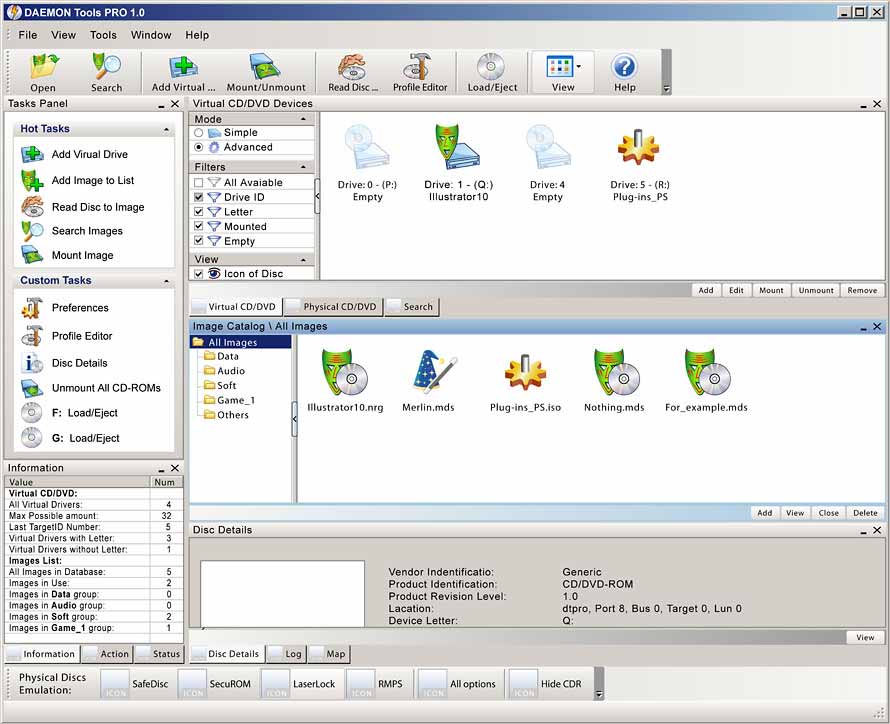
    Changelog :

    • Included DT Panel with Internet search box and "Mount'n'Drive manager"
    • DT tray behaviour changed to DT Pro style
    • Languages are now changed more easily and more convenient
    • Fixed several bugs

      ( included is SPTD version Version 1.53 )


                  Pour le téléchargement veuillez clicquez sur le logo ci-dessous !

                      Accéder à la page de téléchargement


    vendredi 14 décembre 2007

    DVDFab Platinum , Gold et Decrypter 4.0.2.0 Beta

    Mise a jour de ce programme toujours GRATUIT ! DVDFab HD Decrypter remplace désormais  DVDFab Decrypter qui a les même fonctions et en plus supporte les fonctions HD-DVD et Blu-Ray ( Retire la protection AACS )

    Change log :

    - New: Added support for a new CORE X2 protection as found on "Next", (R2, Czech).
    - New: Improved DVD structure cleaning module. Now DVDFab output is more compatible with other DVD programs.
    - New: Improved PathPlayer to determine some special paths.
    - New: Added support for Microsoft ZUNE and Xbox 360.
    Please note you need have installed Windows Media Player 11 to use the feature.
    - New: Added devices "ZUNE, NDS, Xbox 360 and PS3" to navigation bar.
    - Fix: A problem that encoding speed slows down to zero in certain cases, for "DVD to Mobile".

                         Télécharger DVDFab HD Decrypter 4.0.2.0 Beta

  •       DVDFab Platinum est un logiciel tout en un pour copier/convertir/graver les DVD. En seulement une ou deux étapes, vous pouvez copier n'importe quel DVD sur DVDR/PSP/iPod/etc.

    DVDFab Platinum 3 est tout nouveau, complètement réécrit, et basé sur plus de 6 années de développement de logiciel de copie DVD.

    Principales fonctionnalités :
    A. DVD à DVD
    1. 7 modes de copie de DVD à DVD disponibles: Disque entier, Film principal, Diviser, Personnaliser, Cloner, Fusionner et Ecriture de données.
    2. Disque entier: Tous les films, menus et bandes-annonces, sont copiés sur un DVD en un seul clic.
    3. Film principal: Ne copie que le film, avec les langues/sous-titres choisis.
    4. Diviser: Copie un DVD-9 (double couche) sur deux DVD-5 (simple couche) avec une qualité de 100%, tout en préservant les menus originaux sur les deux disques. Idéal pour les DVD vidéo avec des épisodes/saisons, séries TV, etc.
    5. Personnaliser: Personnaliser vos DVD! Vous voulez faire un DVD en gardant seulement vos titres préférés? Ou bien enlever ces ennuyantes publicités? Ou bien sélectionner des langues/sous-titres spécifiques? Pas de problème! Vous pouvez sélectionner vos titres favoris, spécifier l'ordre de lecture des titres, avec ou sans les menus originaux, pour créer un DVD avec le contenu que vous voulez!
    6. Cloner: Faire une copie 1:1 bit-à-bit parfaite de DVDs:
      • Faire une copie parfaite des DVD double couche en utilisant la position originale du changement de couche.
      • Copier les disques DVD de données, comme les DVD PS2.
    7. Fusionner: Combiner plusieurs titres de plusieurs sources en un seul DVD:
      • Combiner 2 DVD-9 (double couche) comme par exemple "Le seigneurs des anneaux" en un seul DVD-9.
      • Fusionner les DVD par saisons pour avoir moins de disques.
      • Créez votre propre disque de collection avec caractéristiques spéciales.
    8. Vitesse de copie ultra rapide, normalement entre 10 et 20 minutes.
    9. Graver sur n'importe quel disque DVD vierge (DVD+R/RW, DVD-R/RW, DVD+R DL, DVD-R DL).
    B. DVD à Portable
    1. 6 modes de copie de DVD à Portables: Générique, iPod, PSP, Téléphone portable, PVP et PDA. Plus de support de périphériques peuvent être ajoutés manuellement.
    2. Générique: Convertit un titre DVD en un fichier MPEG-4/DivX/XVID/H.264 AVI/MP4. Prend aussi en charge les périphériques qui ne sont pas listés dans la barre de navigation.
    3. iPod : Convertit un titre DVD en un fichier Apple iPod MPEG-4/H.264 MP4.
    4. PSP : Convertit un titre DVD en un fichier Sony PSP MPEG-4/H.264 MP4.
    C. Avantages
    1. Enlève toutes les protections DVD, comme CSS, CPPM, RC, RCE, APS, UOPs, ARccOS, RipGuard, FluxDVD, CORE X2, etc.
    2. Constamment mis à jour pour fonctionner avec les dernières protections.
    3. Copie les disques rayés/sales:
      • Même si des informations (IFO) ne peuvent être lues, vous pouvez quand même copier le film principal ou le personnaliser.
      • Récupération des erreurs de lecture (VOB) DVD.
    4. Constamment mis à jour pour supporter les derniers graveurs de DVD et disques vierges.
    5. Constamment mis à jour pour supporter encore plus de périphériques portables.
    6. Mise à jour GRATUITE à vie.
    7. Mise à jour GRATUITE à vie par email, partout dans le monde.


    Recommandations système
    • Windows Vista/XP/2000/98/ME
    • Pentium II 500 MHz
    • 256 MB de mémoire vive
    • 10 GB d'espace disque libre
    • Un lecteur DVD-R(W) ou DVD+R(W)


        DVDFab Gold est un logiciel de copie très rapide et facile à utiliser. En un seul clic, vous pouvez copier n'importe quel DVD sur DVDR.

    Principales fonctionnalités
    A. DVD à DVD
    1. 4 modes de copie de DVD à DVD disponibles: Disque entier, Film principal, Diviser et Ecriture de données.
    2. Disque entier: Tous les films, menus et bandes-annonces, sont copiés sur un DVD en un seul clic.
    3. Film principal: Ne copie que le film, avec les langues/sous-titres choisis.
    4. Diviser: Copie un DVD-9 (double couche) sur deux DVD-5 (simple couche) avec une qualité de 100%, tout en préservant les menus originaux sur les deux disques. Idéal pour les DVD vidéo avec des épisodes/saisons, séries TV, etc.
    5. Vitesse de copie ultra rapide, normalement entre 10 et 20 minutes.
    6. Grave sur n'importe quel DVD vierge (DVD+R/RW, DVD-R/RW, DVD+R DL, DVD-R DL).
    B. Avantages
    1. Enlève toutes les protections DVD, comme CSS, CPPM, RC, RCE, APS, UOPs, ARccOS, RipGuard, FluxDVD, CORE X2, etc.
    2. Constamment mis à jour pour supporter les dernières protections.
    3. Copie les disques rayés/sales:
      • Même si quelques informations (IFO) ne peuvent être lues, vous pouvez quand même copier le film principal ou le personnaliser.
      • Récupération des erreurs de lecture (VOB) DVD.
    4. Constamment mis à jour pour supporter les derniers graveurs de DVD et disques vierges.
    5. Mise à jour GRATUITE à vie.
    6. Mise à jour GRATUITE à vie par email, partout dans le monde.

                   Pour Télécharger , cliquez sur l'image correspondant à votre choix !

                                 Télécharger DVDFab Platinum             Télécharger DVDFab Gold

  • PC Tools ThreatFire 3.0.13.9


     ThreatFire is an easy-to-use application designed to protect your computer against malware such as trojans, spyware, rootkits, keyloggers, and buffer overflows by intelligently detecting and blocking behavior consistent with that of malware. ThreatFire does this by constantly monitoring your system, and analyzing programs and process activity. Whenever ThreatFire detects any unusual process or activity, it will display an alert with further information on the threat. If it is a known threat, then ThreatFire will automatically quarantine the malware and no further action is required on your part.  If the threat is unknown, or new, then ThreatFire will display an alert and prompt you to Allow or Quarantine the process.  All alerts provide detailed information to help you make an informed decision.

    New features:
    - Cyberhawk is now named ThreatFire, which has a new look and feel and is branded as a PC Tools product. The basic product layout and functions are similar to the older version, so hopefully it will be easy to make the switch to ThreatFire.
    - Certain features previously found only in Cyberhawk Pro are now available in the new free product: ThreatFire Free Edition. These features include malware quarantine and removal, advanced custom rules, the rootkit scanner, and the built-in search on ThreatFire alerts which allows you to find out additional information on a threat.
    - The “potentially malicious” alerts (yellow alerts) now give the option to Allow or Quarantine, instead of Allow or Deny. This is because ThreatFire is now able to quarantine any threats it detects, not just threats that were classified as “known” malware.
    - The new Pro version includes the on-demand scanning piece of PC Tools AntiVirus so that you can scan your system for dormant threats that may not be caught by ThreatFire’s real-time behavior-based protection. This AV scanner greatly increases the overall protection offered by ThreatFire and offers protection from a full spectrum of both known and unknown threats.
    - Greatly improved the overall protective capability of ThreatFire since the Cyberhawk v. 2.04 release.
    - Fewer false positives.
    - Miscellaneous other program fixes.


    Known issues:

    • Quarantine is not fully functional before rebooting.
    • Uninstalling after having run a system scan still leaves some files.
    • Advanced Rules for the registry are not fully functional
    • Suspending ThreatFire does not fully suspend the product and you may still see an alert on the thread injection rule.


    Notes:
    ThreatFire is the new name of the behavior-based anti-malware program formerly known as Cyberhawk. With this release of v. 3.0 and going forward, the program will be known as ThreatFire and support for Cyberhawk will be shifted to ThreatFire.


    Important note to current Cyberhawk users:
    Due to the changes included in this newest release, it is not possible to have both Cyberhawk and ThreatFire installed at the same time. Please be sure to first uninstall Cyberhawk before you install ThreatFire.


    There are two versions available:

    ThreatFire Free Edition and ThreatFire Pro.
    The free version will be available for home and business users completely free of charge. The Pro version includes a new on-demand antivirus scanner (from PC Tools AntiVirus) for additional protection and cleanup capability.

               Traditional Security Product Solo vs. Traditional Product with ThreatFire


    *Results produced by testing over 1300 malware threats collected from the ThreatFire Security Community and secured from other 3rd party sources. Competitor products tested were Trend Micro Internet Security 2007, Webroot Spy Sweeper with Antivirus v. 5, CA Internet Security 2007, Norton Internet Security 2007, and McAfee Internet Security 2007, all with the latest available updates as of the date of test.

                                                   Download ThreatFire Now

                                       Télécharger PC Tools ThreatFire 3.0.13.9

    jeudi 13 décembre 2007

    Xbox 360 HD DVD Emulator Now Available


    The Xbox 360 HD DVD Emulator is now available! The emulator is downloaded through Xbox LIVE Marketplace on your existing Xbox player. The Xbox 360 HD DVD Emulator can run projects from an optical disc, an external USB drive, or from a network drive, and logs API calls, errors, warnings, and exceptions with time code information to a networked PC. The emulator also comes with support provide through the Microsoft Connect site.

    View: More Information

    Advanced WindowsCare v2 Personal 2.5.7.833

    Advanced WindowsCare Personal Edition


                                                   100% Free Download !!


             This comprehensive PC-care utility has a one-click approach to helping protect, repair and optimize your PC. Advanced WindowsCare Personal Edition helps protect, optimize, and repair your PC with daily use.


             Features of this fantastic, award-winning, 100% free program include:

    • Ending slow downs, freezes, crashes, and security threats.
    • Scanning and finding what other utilities miss on your PC.
    • Keeping your PC error-free and running more smoothly than ever.
    • Designed for Windows Vista, XP, and 2000.
    • Over 5,000,000 downloads since 2006.
    • Availability is free of charge for private use.
    • Plus, Advanced WindowsCare Personal is 100% safe and clean with no adware, spyware, or viruses.

    Start PC repairs for free with Advanced Windowscare Personal Edition